
How a lease desk is different
A car-lease broker finds the customer, finds the car, and has a dealer deliver it. The customer signs a lease with a bank. The dealer then pays the broker for the deal, often in more than one piece and sometimes weeks later. Two or three years on, that lease ends, and the broker who stays in touch gets the next deal.
That is a different shape from a general sales pipeline. The money arrives from the dealer, not the customer. The most valuable lead is a customer you already have. And the date that matters most is not a close date but a lease-end date. A CRM for a lease desk has to be built around those facts.
What brokers need, and where to find it in LeaseDash
| What a lease desk needs | How LeaseDash handles it |
|---|---|
| Know when every lease ends | A lease end date on each customer car, with timing rules by make and model. Lease-end follow-ups. |
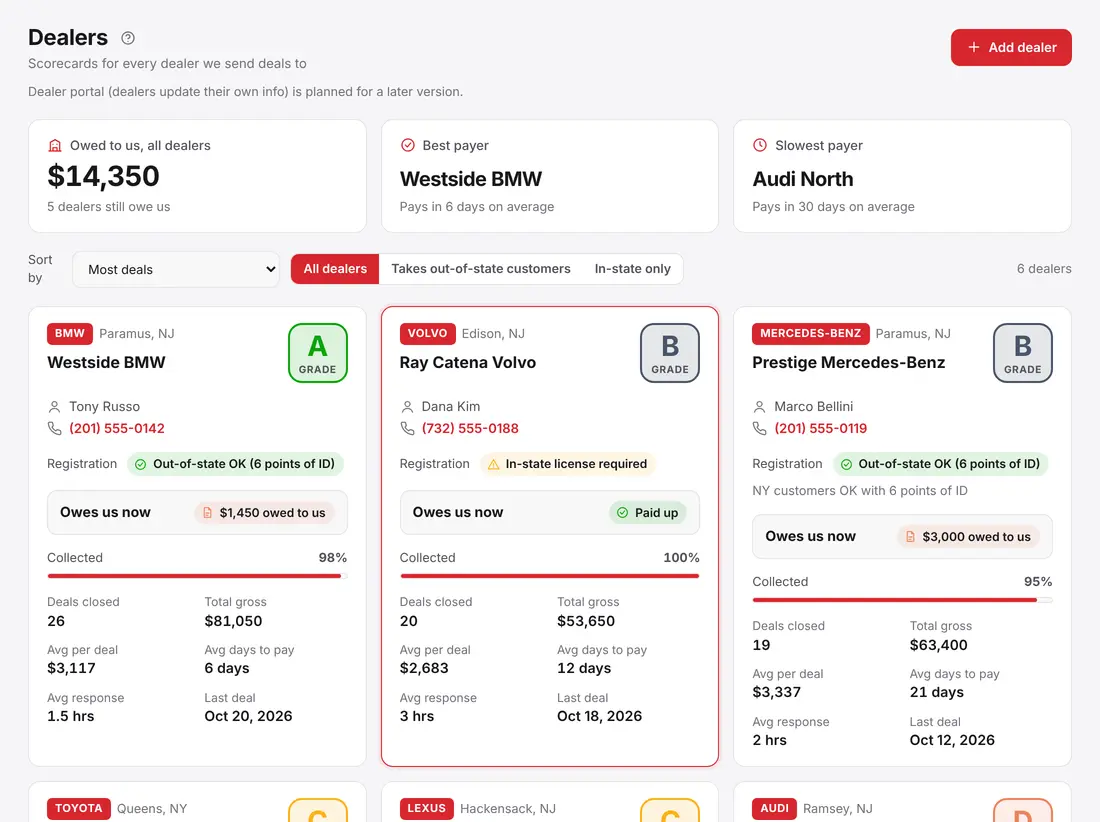
| Know what each dealer owes | Deal money on every deal, dealer payments recorded as they arrive, and a scorecard per dealer. Dealer payments and commissions. |
| Pay reps correctly | A commission percent per rep, calculated from each deal's net profit. |
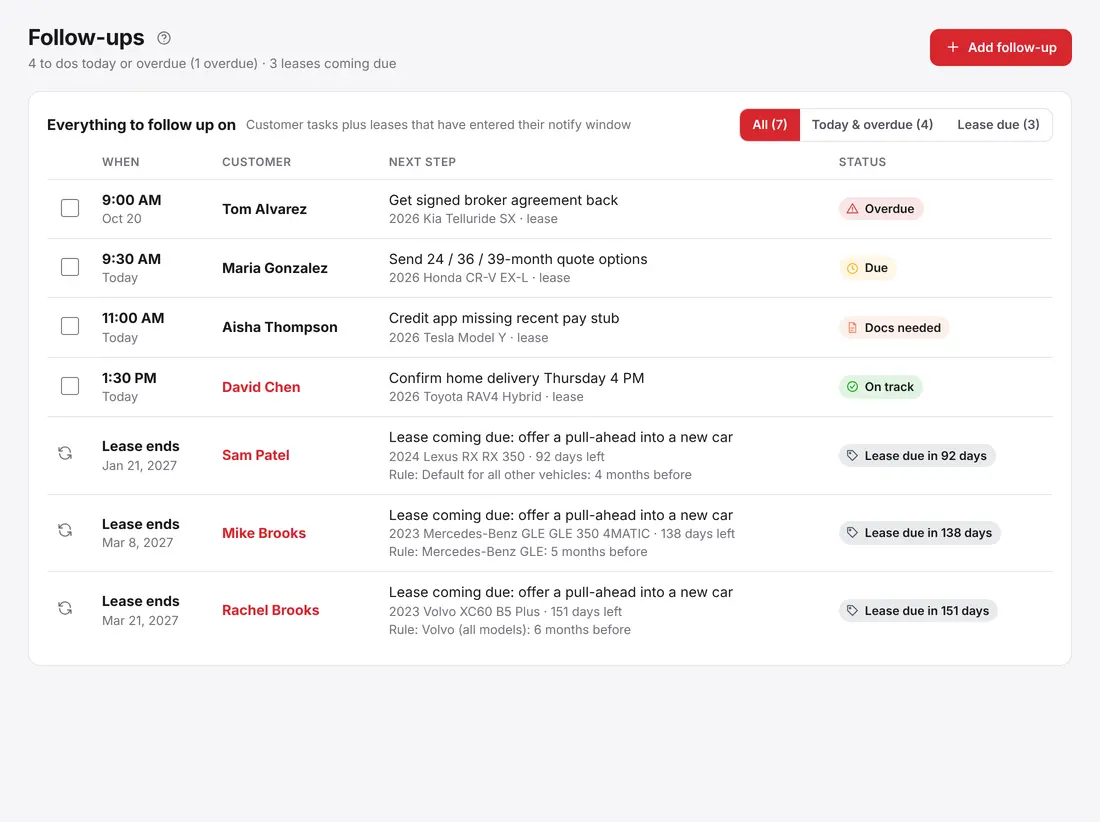
| Never drop a follow-up | One Follow-ups list for callbacks, tasks and leases coming due. |
| Handle turn-ins | A Lease returns list with due date, bank, turn-in point, mileage and status. |
| Keep the books | The optional Accounting package, next to your deals. Accounting for a lease desk. |
Lease-end tracking
Each car a customer leases carries a lease end date. You decide how early to reach out for each make and model: for example Volvo at 6 months, Mercedes GLE at 5 and C-Class at 3, with a default for everything else. When today falls inside a lease's window, the customer is added to your Follow-ups on their own, tagged Lease due, with a prompt to talk about pulling ahead into a new car.
Leases your customers took out elsewhere count too. If you know the end date, you can start the conversation before another broker does. A lease-due alert is a customer appearing on your list at the right moment. The alert itself is not a message: you make the call. If you set up lease-end emails, LeaseDash can also email customers who gave your agency permission. It never texts. The full walk-through is in Set up lease-due alerts.
Dealer money
On every deal you type what the deal makes (gross) and what you have collected so far (COD). LeaseDash works out the rest: the dealer owes you the difference, your net profit is the gross minus anything you owe out, and the rep's commission is their percent of that net profit. When a dealer pays you in pieces, you record each payment and the balance goes down.
Every dealer also gets a scorecard: volume, average payout per deal, what they still owe, days to pay (from the payments you record) and the response time you record, with a letter grade. When you are deciding where to send the next deal, you can see who pays. See How the dealer-owes and commission math works.
Commissions
An Admin sets each rep's commission percent, and the amount owed calculates on every deal. When you pay the rep, you mark the deal Mark rep paid, and you can undo it if you slip. Every change is written to the activity log, so there is a record of who changed what. The Commissions by rep report shows earned, paid and still owed.
Follow-ups and leads
Follow-ups is the list you start the morning with: your own reminders and the lease-due customers LeaseDash added for you. Overdue items stay at the top until you finish them.
New leads can come from your agency's Instagram (it needs an Instagram professional account, Business or Creator), from a short questionnaire link a customer fills in on their own phone, or from an Excel or CSV spreadsheet you import. The import shows a preview before anything is saved and skips people who are already on file. Leads move across a pipeline, and when one says yes you close the deal and the customer gets a file.
Lease returns and turn-ins
The old lease cars going back to the bank have due dates, banks and turn-in points. LeaseDash keeps each return in one list with the mileage and a status, and raises alerts for returns that are overdue or due this week. Nothing about a turn-in has to live in your head.
Tools that help close the deal
- Driveway fit finder: type the driveway or garage width and see every car that fits, with the spare inches.
- Real car pictures: send a customer a link to photos of the car in the colors and views they want.
- Payment links and invoices: on the Team and Agency plans.
- Permissions: Admins see everyone, Supervisors see their team, Users see their own customers, and you can adjust by group or person.
- Phone friendly: works in any browser. The iPhone and iPad app is in the App Store; Android is coming soon.
What LeaseDash is not
LeaseDash does not replace your lease calculator or desking tool. Keep quoting there, and use LeaseDash for the customer, the follow-ups, the dealers and the money. Dealers do not log in to LeaseDash: they are records in your CRM. LeaseDash has not been audited by a third party, and we do not claim security certifications.
Plans and trial
Every plan starts with a 14-day free trial, and setup and data import help are available. Solo is $204 a month by card, card processing included ($1,999 a year by bank (ACH), $2,049 by card) for one or two people. Team is $409 a month ($3,999 a year by bank, $4,099 by card) for 1 to 5 users, and it is the plan we recommend even for a desk of one. Agency is $819 a month ($7,999 a year by bank, $8,199 by card) for up to 15 users. Solo has a one-time $399 onboarding fee. The Accounting package is $49 a month on Team and included on Agency. See pricing for the details.
LeaseDash is designed, built and supported in the USA, and customer data is stored on servers in the United States.