
Why lease-ends matter
Every customer you have placed in a car will, one day, have a lease that ends. They will lease again, and the question is whether they do it with you. A customer who already trusts you is easier to talk to than a stranger from an ad, and you already have their details. The only thing that goes wrong is timing: nobody remembers that a customer's lease ends in March when it was signed two and a half years ago.
Spreadsheets can hold the date, but nothing makes you look at it. The method below puts lease ends where you already work, in your follow-up list, at the moment you choose.
Step 1: capture the lease end date
Each customer car in LeaseDash™ has a lease end date. You fill it in when you close a lease deal, and you can check or fix it on the customer's file at any time. If you have years of customers in a spreadsheet, import them: save the sheet as a CSV, choose the columns, look over the preview, and nothing is saved until the last step. The import skips people who are already on file, and importing the same file twice is safe. The limit is 2,000 rows and 2 MB per file. See Import leads or customers from a spreadsheet.
Step 2: set how early to reach out
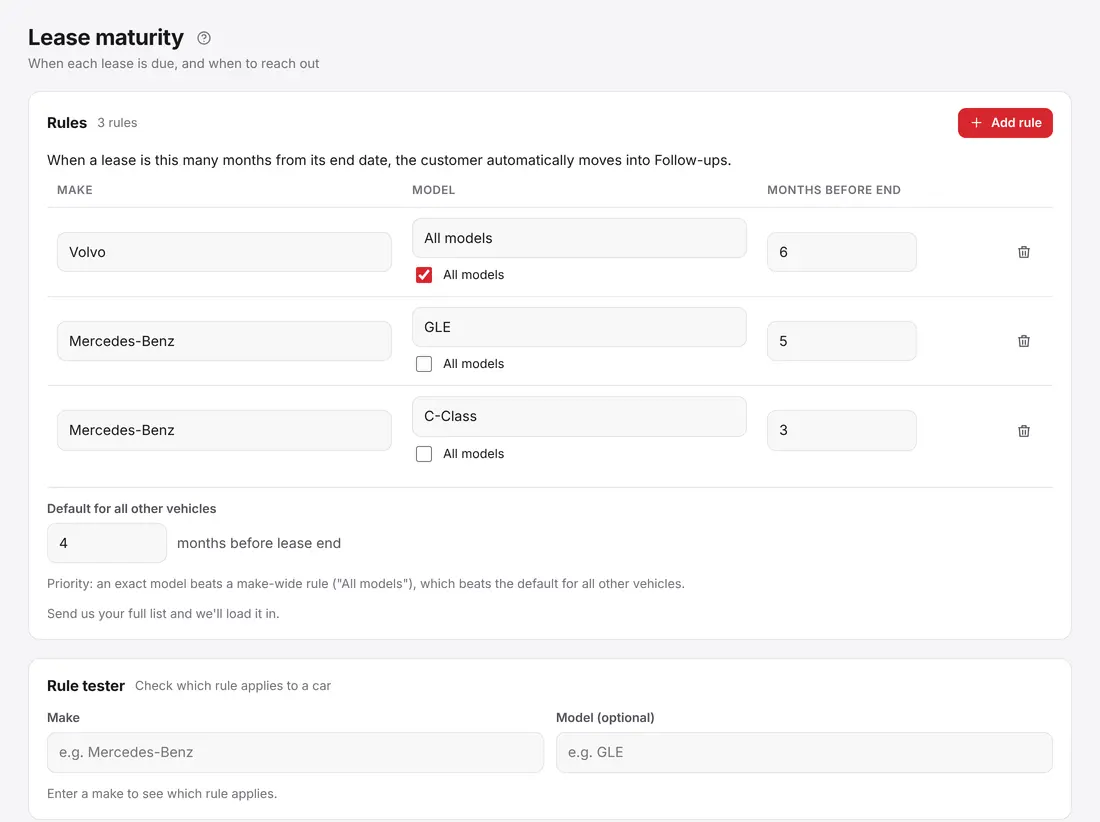
Different cars call for different timing. Open Lease maturity and add a rule for a make, or for one model, with the number of months before the lease ends, from 1 to 12. For example:
- Volvo: 6 months before the lease ends
- Mercedes GLE: 5 months
- Mercedes C-Class: 3 months
Those are examples of how the rules work, not recommendations: the right number depends on your market and how long your deals take to arrange. At the bottom is a default for all other vehicles, used when no rule matches. You can change any rule at any time.
Step 3: check the rules before you trust them
Two tools help. The Rule tester takes a make and a model and tells you which rule would apply, or that the default applies. The Upcoming lease ends list shows every lease and the day it enters its window, so you can see the next few months of work in advance.
Step 4: work the follow-up list
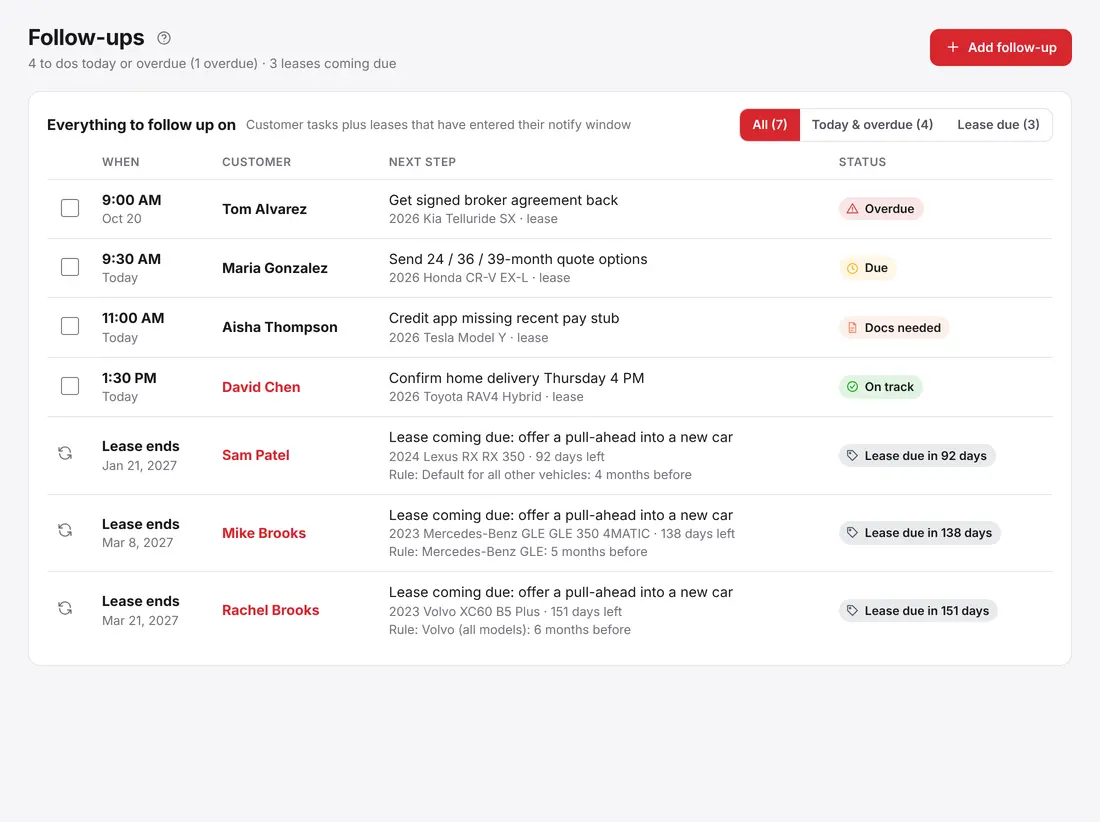
When today falls inside a lease's window, the customer is added to Follow-ups automatically, tagged Lease due. Each one comes with a pull-ahead prompt, so a new car is the first thing you talk about. You call the customer, and when you finish the follow-up it clears off the list. Overdue items stay at the top until you deal with them, so nothing quietly disappears.
One point to be clear about: a lease-due alert is not a text or an email sent to the customer. It is a customer showing up on your list. You decide what to say and how to reach them. If you also set up lease-end emails, LeaseDash can email customers who gave your agency permission. It never sends texts.
Leases you did not write
If a customer leased somewhere else and you know when that lease ends, record it. These show as "Elsewhere" and follow the same rules, so you can approach them before their current broker does. It is a polite, useful call: you are helping them plan ahead.
Do not forget the turn-in
When the lease does end, the car goes back to the bank. LeaseDash keeps a Lease returns list with the due date, the bank, the turn-in point, the mileage and a status, and it raises alerts for returns that are overdue or due this week. A smooth turn-in is part of the repeat-business conversation: the customer remembers who handled it.
Habits that help
- Enter the lease end date the day you close the deal, while the paperwork is in front of you.
- Add the next follow-up while you are still on the phone. It takes ten seconds.
- Review Upcoming lease ends once a month and adjust your rules by make if some windows feel too early or too late.
- Give each rep their own customers, and use permissions so Supervisors can see their team's lease-due list.
Try it
Lease-due alerts and follow-ups are part of every plan, including Solo. Start with the 14-day free trial, or book a demo and bring a sample of your own customers. For the whole picture of what a lease desk needs, read the CRM built for car-lease brokers, and for the step-by-step screens see the guide Set up lease-due alerts and Add and finish follow-ups.